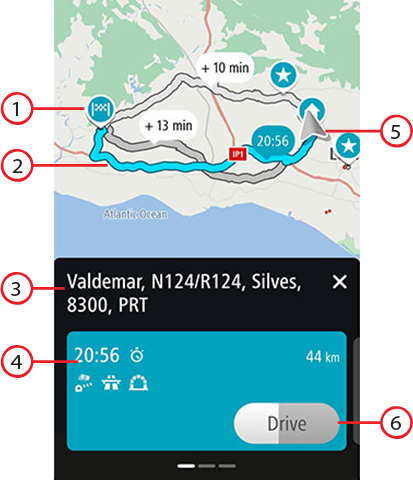
When you have chosen a destination, and you select Drive, the route selection screen appears.
From here, you can select your preferred route from the three options that are given to you.
Destination. This is the location of the destination that you want to drive to.
Your route. If available, three routes are shown. The fastest route is highlighted. The other two optional routes are shown with the additional time required.
Destination address.
Route details panel. For the chosen route, this panel gives you:
The arrival time
The distance
Any delay on the route (such as traffic jams, road work) that affect your arrival time
Icons that represent specific features of the route, such as tolls, highways, or tunnels, that may affect your trip.
You can swipe left and right to view details of the other routes. As you do this, the route is highlighted on the map.
Current location.
Drive button. Click on this button to choose your route and go to the guidance view. This button also shows the time left to choose another route. If you get to this screen and do nothing, the fastest route will automatically be chosen.